Your tank does not stop at 3am. Neither should the controller.
Pharos Pods is a reef controller built around Tank Nodes. These are small sensing units that hold your safety limits themselves, so a dropped network means a quiet log entry instead of a dead pump and a lost colony.
The alarm reaches you as a text message, not a push notification. The controller checks in to a service I run outside your house, and when those check-ins stop, that service texts your phone. A text is the last thing to stop working: nothing to have installed, no notifications to have left switched on, no internet at your end. A phone with one bar of signal still gets it. Designed and decided, not built.
In build and testing, for a 120 gallon SPS and LPS mixed reef. The hardware is not shipping yet. The interface is built, and you can walk through it now.
Try it
Break it, and watch what happens
This is the Pod interface, running in your browser. The readings are a generated pattern on a loop, not my tank — but the limits reacting to them are the real ones, and nothing here is a video. Time is compressed: a failure that would take hours plays out in about fifteen seconds. Four screens are live. The rest of the system is not in the public demo.
Press Cut the network, then Heater sticks on, and open the Equipment tab: the mains heater is cut anyway. That part is the design, not the bench. The node switches its 12 V ports itself, and that part is in testing. Mains without the network needs the controller’s own network and Pharos Power, and both are designed and decided, not built.
Nothing in the demo above is sent anywhere and nothing is stored. Reload and it starts over.
Ten questions, no signup
Some of this is still undecided, and the decisions are better made with answers than with guesses. It takes two minutes, asks nothing about who you are, and the box asking what I have got wrong is the one I read first. Open questions.
Two things it does differently
Reef controllers mostly agree on what to measure. The differences show up on the bad days.
Lighthouse Mode
Runs without the networkWhen the network is part of how a tank stays alive, the router is a single point of failure. Tank Nodes are built the other way: the limits live on the node, so when WiFi drops it keeps enforcing them and carries on alone. A beacon on every screen tells you which state you are in without hunting through menus.

Hand testing stays hand testing
Some things already workA syringe and a vial do not drift, do not clog and have never needed a firmware update. So the first release is built around the test kit you already own: type a result in and it lands in the same record as everything the probes are reading, with the same history behind it.
Two screens that do the most work
Most of an interface tells you what is happening right now. These two tell you what has been happening, which is usually where the answer is.
PAR map
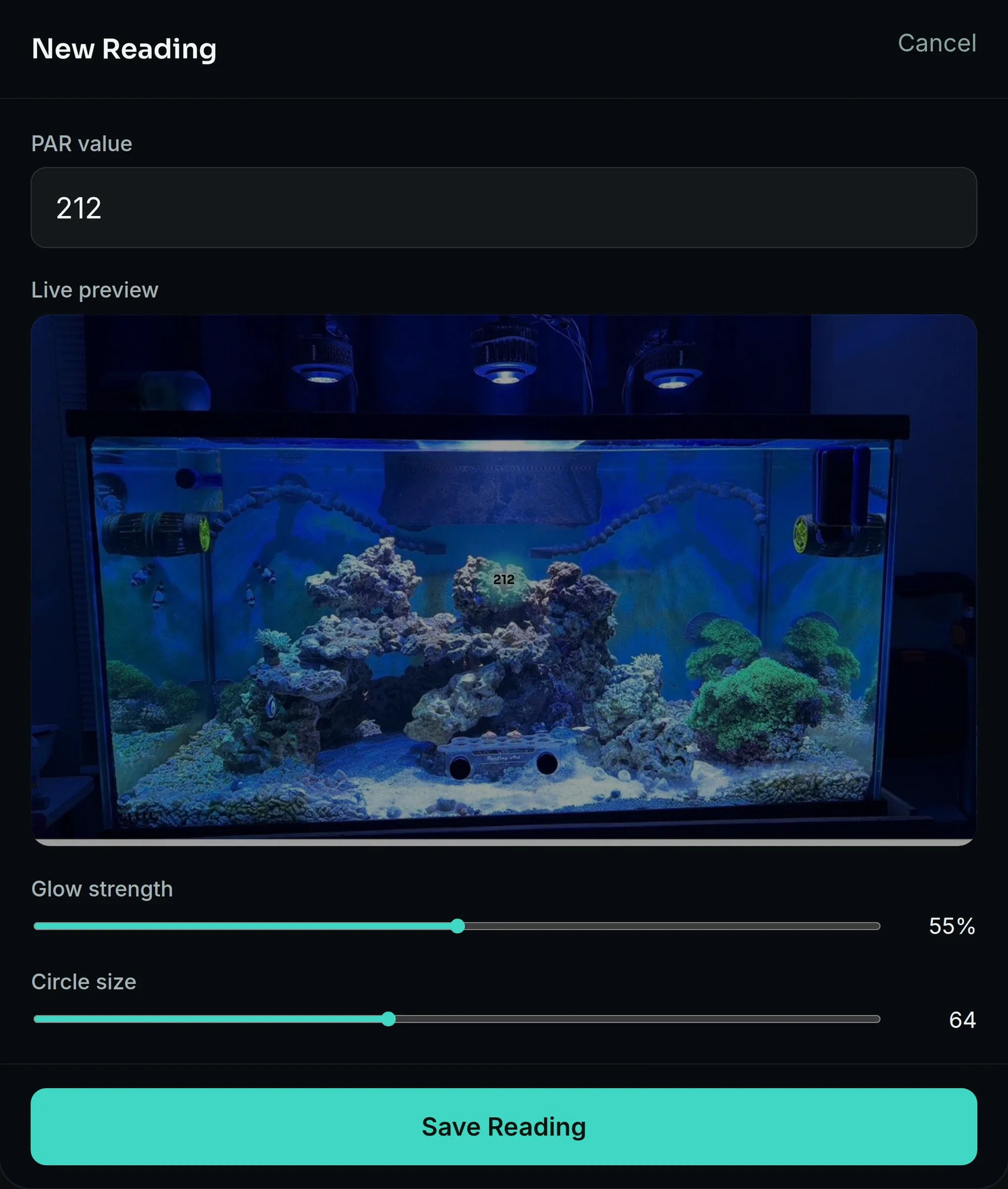
Light, where it actually landsA photograph of your own tank with readings placed on it. Walk a meter around once, tap the spot you measured, type the number. The map holds a separate set for morning, midday and afternoon, so you are comparing the same rock at the same hour rather than guessing from the fixture's spec sheet. When something stops looking right, you have a number for that exact spot and a record of what it used to be.

Trends
The day behind the numberAny reading on any screen opens into its own history. A pH of 8.12 tells you where you are standing. The day behind it tells you whether the swing is widening, whether the reactor kept up overnight, and whether last night looked like the one before. Day, week, month and year, on the same screen you are already looking at.

One tank, or a building
The same hardware runs a display tank and a retail rack. What changes is how much of it you are looking after at once.
A reef at home
For a display tank, a frag system, or a few tanks in one house. Accounts are not open yet, and the list on this page is the queue for them. The plan is an account that gets you into the interface before the hardware exists — the real screens in your browser with simulated probes, so the tank you set up there is the tank that loads onto the Pod later. It would let you:
- Walk the actual controller screens, not renders
- Set up your tank: probes, thresholds, dosing, schedules
- Keep that configuration and load it onto real hardware later
- Get first access to beta units
Four screens of the interface are already public and need no account at all — try those here. Today the only thing asked for is an email address.
Multiple or custom setups
Fish stores, frag rooms, hatcheries, labs and anyone running racks of tanks off one controller. The same hardware, in build and testing now. The store build is designed and decided, not built — the three-node cap coming off, and a screen built for watching a building rather than automating a tank.
Beta
Beta units go out to a small group once the personal build has run long enough to trust. Announcements happen here and on the launch list, so there is no separate signup to miss. The build itself is being documented as it happens, and those two accounts are where it goes if you want to see what it looks like before it is finished.
What a beta tester is signing up for
Real hardware on a real tank, with the understanding that it is early. The failures are the point. Reef tanks, frag systems and commercial racks go in the same queue. When accounts open, that is where you say which one you are.